


The Animation Framework▲
The animation framework aims to provide an easy way for creating animated and smooth GUIs. By animating Qt properties, the framework provides great freedom for animating widgets and other https://s. The framework can also be used with the Graphics View framework. Many of the concepts available in the animation framework are also available in Qt Quick, where it offers a declarative way of defining animations. Much of the knowledge acquired about the animation framework can be applied to Qt Quick.
In this overview, we explain the basics of its architecture. We also show examples of the most common techniques that the framework allows for animating https://s and graphics items.
The Animation Architecture▲
We will in this section take a high-level look at the animation framework's architecture and how it is used to animate Qt properties. The following diagram shows the most important classes in the animation framework.
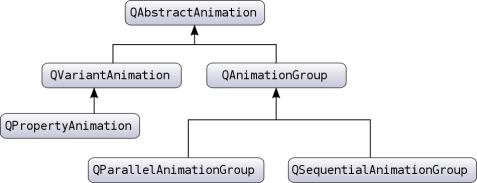
The animation framework foundation consists of the base class https://, and its two subclasses https:// and https://. https:// is the ancestor of all animations. It represents basic properties that are common for all animations in the framework; notably, the ability to start, stop, and pause an animation. It is also receives the time change notifications.
The animation framework further provides the https:// class, which inherits https:// and performs animation of a Qt property, which is part of Qt's https://. The class performs an interpolation over the property using an easing curve. So when you want to animate a value, you can declare it as a property and make your class a https://. Note that this gives us great freedom in animating already existing widgets and other https://s.
Complex animations can be constructed by building a tree structure of https://s. The tree is built by using https://s, which function as containers for other animations. Note also that the groups are subclasses of https://, so groups can themselves contain other groups.
Behind the scenes, the animations are controlled by a global timer, which sends https:// to all animations that are playing.
For detailed descriptions of the classes' function and roles in the framework, please look up their class descriptions.
Classes in the Animation Framework▲
These classes provide a framework for creating both simple and complex animations.
-
https://: The QAbstractAnimation class is the base of all animations.
-
https://: The QAnimationGroup class is an abstract base class for groups of animations.
-
https://: The QEasingCurve class provides easing curves for controlling animation.
-
https://: The QParallelAnimationGroup class provides a parallel group of animations.
-
https://: The QPauseAnimation class provides a pause for QSequentialAnimationGroup.
-
https://: The QPropertyAnimation class animates Qt properties.
-
https://: The QSequentialAnimationGroup class provides a sequential group of animations.
-
https://: The QTimeLine class provides a timeline for controlling animations.
-
https://: The QVariantAnimation class provides a base class for animations.
Animating Qt Properties▲
As mentioned in the previous section, the https:// class can interpolate over Qt properties. It is often this class that should be used for animation of values; in fact, its superclass, https://, has an empty implementation of https://(), and does not change any value unless we change it ourselves on the https://.
A major reason we chose to animate Qt properties is that it presents us with freedom to animate already existing classes in the Qt API. Notably, the QWidget class (which we can also embed in a QGraphicsView) has properties for its bounds, colors, etc. Let's look at a small example:
QPushButton button("Animated Button");
button.show();

QPropertyAnimation animation(&button, "geometry");
animation.setDuration(10000);
animation.setStartValue(QRect(0, 0, 100, 30));
animation.setEndValue(QRect(250, 250, 100, 30));

animation.start();
This code will move button from the top left corner of the screen to the position (250, 250) in 10 seconds (10000 milliseconds).
The example above will do a linear interpolation between the start and end value. It is also possible to set values situated between the start and end value. The interpolation will then go by these points.
QPushButton button("Animated Button");
button.show();

QPropertyAnimation animation(&button, "geometry");
animation.setDuration(10000);

animation.setKeyValueAt(0, QRect(0, 0, 100, 30));
animation.setKeyValueAt(0.8, QRect(250, 250, 100, 30));
animation.setKeyValueAt(1, QRect(0, 0, 100, 30));

animation.start();
In this example, the animation will take the button to (250, 250) in 8 seconds, and then move it back to its original position in the remaining 2 seconds. The movement will be linearly interpolated between these points.
You also have the possibility to animate values of a https:// that is not declared as a Qt property. The only requirement is that this value has a setter. You can then subclass the class containing the value and declare a property that uses this setter. Note that each Qt property requires a getter, so you will need to provide a getter yourself if this is not defined.
class MyGraphicsRectItem : public QObject, public QGraphicsRectItem
{
    Q_OBJECT
    Q_PROPERTY(QRectF geometry READ geometry WRITE setGeometry)
};
In the above code example, we subclass QGraphicsRectItem and define a geometry property. We can now animate the widgets geometry even if QGraphicsRectItem does not provide the geometry property.
For a general introduction to the Qt property system, see its https://.
Animations and the Graphics View Framework▲
When you want to animate QGraphicsItems, you also use https://. However, QGraphicsItem does not inherit https://. A good solution is to subclass the graphics item you wish to animate. This class will then also inherit https://. This way, https:// can be used for QGraphicsItems. The example below shows how this is done. Another possibility is to inherit QGraphicsWidget, which already is a https://.
class Pixmap : public QObject, public QGraphicsPixmapItem
{
    Q_OBJECT
    Q_PROPERTY(QPointF pos READ pos WRITE setPos)
    ...
As described in the previous section, we need to define properties that we wish to animate.
Note that https:// must be the first class inherited as the meta-object system demands this.
Easing Curves▲
As mentioned, https:// performs an interpolation between the start and end property value. In addition to adding more key values to the animation, you can also use an easing curve. Easing curves describe a function that controls how the speed of the interpolation between 0 and 1 should be, and are useful if you want to control the speed of an animation without changing the path of the interpolation.
QPushButton button("Animated Button");
button.show();

QPropertyAnimation animation(&button, "geometry");
animation.setDuration(3000);
animation.setStartValue(QRect(0, 0, 100, 30));
animation.setEndValue(QRect(250, 250, 100, 30));

animation.setEasingCurve(QEasingCurve::OutBounce);

animation.start();
Here the animation will follow a curve that makes it bounce like a ball as if it was dropped from the start to the end position. https:// has a large collection of curves for you to choose from. These are defined by the https:// enum. If you are in need of another curve, you can also implement one yourself, and register it with https://.
Putting Animations Together▲
An application will often contain more than one animation. For instance, you might want to move more than one graphics item simultaneously or move them in sequence after each other.
The subclasses of https:// (https:// and https://) are containers for other animations so that these animations can be animated either in sequence or parallel. The https:// is an example of an animation that does not animate properties, but it gets notified of time changes periodically. This enables it to forward those time changes to its contained animations, and thereby controlling when its animations are played.
Let's look at code examples that use both https:// and https://, starting off with the latter.
QPushButton *bonnie = new QPushButton("Bonnie");
bonnie->show();

QPushButton *clyde = new QPushButton("Clyde");
clyde->show();

QPropertyAnimation *anim1 = new QPropertyAnimation(bonnie, "geometry");
// Set up anim1

QPropertyAnimation *anim2 = new QPropertyAnimation(clyde, "geometry");
// Set up anim2

QParallelAnimationGroup *group = new QParallelAnimationGroup;
group->addAnimation(anim1);
group->addAnimation(anim2);

group->start();
A parallel group plays more than one animation at the same time. Calling its https://() function will start all animations it governs.
QPushButton button("Animated Button");
button.show();

QPropertyAnimation anim1(&button, "geometry");
anim1.setDuration(3000);
anim1.setStartValue(QRect(0, 0, 100, 30));
anim1.setEndValue(QRect(500, 500, 100, 30));

QPropertyAnimation anim2(&button, "geometry");
anim2.setDuration(3000);
anim2.setStartValue(QRect(500, 500, 100, 30));
anim2.setEndValue(QRect(1000, 500, 100, 30));

QSequentialAnimationGroup group;

group.addAnimation(&anim1);
group.addAnimation(&anim2);

group.start();
As you no doubt have guessed, https:// plays its animations in sequence. It starts the next animation in the list after the previous is finished.
Since an animation group is an animation itself, you can add it to another group. This way, you can build a tree structure of animations which specifies when the animations are played in relation to each other.