


Quick CoAP Multicast Discovery Example▲
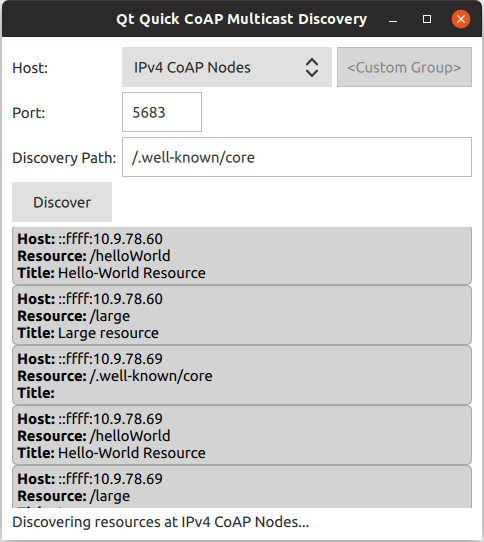
The Quick CoAP Multicast Discovery Example demonstrates how to register QCoapClient as a QML type and use it in a Qt Quick application for CoAP multicast resource discovery.
Qt CoAP does not provide a QML API in its current version. However, you can make the C++ classes of the module available to QML as shown in this example.
Running the Example▲
To run the example application, you first need to set up and start at least one CoAP server supporting multicast resource discovery. You have the following options:
-
Manually build and run CoAP servers using https://, https://, or any other CoAP server implementation, which supports multicast and resource discovery features.
-
Use the ready Docker image available at Docker Hub, which builds and starts CoAP server based on Californium's https://.
Using the Docker-based Test Server▲
The following command pulls the docker container for the CoAP server from the Docker Hub and starts it:
docker run --name coap-multicast-server -d --rm --net=host sokurazy/coap-multicast-test-server:californium.2.0.xYou can run more than one multicast CoAP servers (on the same host or other hosts in the network) by passing a different --name to the command above.
Creating a Client and Using It with QML▲
We create the QmlCoapMulticastClient class with the QCoapClient class as a base class:
class QmlCoapMulticastClient : public QCoapClient
{
    Q_OBJECT

public:
    QmlCoapMulticastClient(QObject *parent = nullptr);

    Q_INVOKABLE void discover(const QString &host, int port, const QString &discoveryPath);
    Q_INVOKABLE void discover(QtCoap::MulticastGroup group, int port, const QString &discoveryPath);

Q_SIGNALS:
    void discovered(const QmlCoapResource &resource);
    void finished(int error);

public slots:
    void onDiscovered(QCoapResourceDiscoveryReply *reply, const QList<QCoapResource> &resources);
};
In the main.cpp file, we register the QmlCoapMulticastClient class as a QML type:
qmlRegisterType<QmlCoapMulticastClient>("CoapMulticastClient", 1, 0, "CoapMulticastClient");We also register the https:// namespace, to be able to use it in QML code:
    qmlRegisterUncreatableMetaObject(QtCoap::staticMetaObject, "qtcoap.example.namespace", 1, 0,
                                     "QtCoap", "Access to enums is read-only");
Now in the QML code, we can import and use these types:
    ...
import CoapMulticastClient 1.0
import qtcoap.example.namespace 1.0
    ...
    CoapMulticastClient {
        id: client
        onDiscovered: addResource(resource)

        onFinished: {
            statusLabel.text = (error === QtCoap.Error.Ok)
                    ? qsTr("Finished resource discovery.")
                    : qsTr("Resource discovery failed with error code: %1").arg(error)
        }

        onError:
            statusLabel.text = qsTr("Resource discovery failed with error code: %1").arg(error)
    }
    ...
The QCoapClient::error() signal triggers the onError signal handler of CoapMulticastClient, and the QmlCoapMulticastClient::finished() signal triggers the onFinished signal handler, to show the request's status in the UI. Note that we are not using the QCoapClient::finished() signal directly, because it takes a QCoapReply as a parameter (which is not a QML type), and we are interested only in the error code.
In the QmlCoapMulticastClient's constructor, we arrange for the QCoapClient::finished() signal to be forwarded to the QmlCoapMulticastClient::finished() signal:
QmlCoapMulticastClient::QmlCoapMulticastClient(QObject *parent)
    : QCoapClient(QtCoap::SecurityMode::NoSecurity, parent)
{
    connect(this, &QCoapClient::finished, this,
            [this](QCoapReply *reply) {
                    if (reply)
                        emit finished(static_cast<int>(reply->errorReceived()));
                    else
                        qCWarning(lcCoapClient, "Something went wrong, received a null reply");
            });
}
When the Discover button is pressed, we invoke one of the overloaded discover() methods, based on the selected multicast group:
    ...
        Button {
            id: discoverButton
            text: qsTr("Discover")
            Layout.columnSpan: 2

            onClicked: {
                var currentGroup = groupComboBox.model.get(groupComboBox.currentIndex).value;

                var path = "";
                if (currentGroup !== - 1) {
                    client.discover(currentGroup, parseInt(portField.text),
                                    discoveryPathField.text);
                    path = groupComboBox.currentText;
                } else {
                    client.discover(customGroupField.text, parseInt(portField.text),
                                    discoveryPathField.text);
                    path = customGroupField.text + discoveryPathField.text;
                }
                statusLabel.text = qsTr("Discovering resources at %1...").arg(path);
            }
        }
    ...
This overload is called when a custom multicast group or a host address is selected:
void QmlCoapMulticastClient::discover(const QString &host, int port, const QString &discoveryPath)
{
    QUrl url;
    url.setHost(host);
    url.setPort(port);

    QCoapResourceDiscoveryReply *discoverReply = QCoapClient::discover(url, discoveryPath);
    if (discoverReply) {
        connect(discoverReply, &QCoapResourceDiscoveryReply::discovered,
                this, &QmlCoapMulticastClient::onDiscovered);
    } else {
        qCWarning(lcCoapClient, "Discovery request failed.");
    }
}
And this overload is called when one of the suggested multicast groups is selected in the UI:
void QmlCoapMulticastClient::discover(QtCoap::MulticastGroup group, int port,
                                      const QString &discoveryPath)
{
    QCoapResourceDiscoveryReply *discoverReply = QCoapClient::discover(group, port, discoveryPath);
    if (discoverReply) {
        connect(discoverReply, &QCoapResourceDiscoveryReply::discovered,
                this, &QmlCoapMulticastClient::onDiscovered);
    } else {
        qCWarning(lcCoapClient, "Discovery request failed.");
    }
}
The QCoapClient::discovered() signal delivers a list of QCoapResources, which is not a QML type. To make the resources available in QML, we forward each resource in the list to the QmlCoapMulticastClient::discovered() signal, which takes a QmlCoapResource instead:
void QmlCoapMulticastClient::onDiscovered(QCoapResourceDiscoveryReply *reply,
                                          const QList<QCoapResource> &resources)
{
    Q_UNUSED(reply)
    for (auto resource : resources)
        emit discovered(resource);
}
QmlCoapResource is a wrapper around QCoapResource, to make some of its properties available in QML:
class QmlCoapResource : public QCoapResource
{
    Q_GADGET
    Q_PROPERTY(QString title READ title)
    Q_PROPERTY(QString host READ hostStr)
    Q_PROPERTY(QString path READ path)

public:
    QmlCoapResource() : QCoapResource() {}
    QmlCoapResource(const QCoapResource &resource)
        : QCoapResource(resource) {}

    QString hostStr() const { return host().toString(); }
};
The discovered resources are added to the resourceModel of the list view in the UI:
    ...
    function addResource(resource) {
        resourceModel.insert(0, {"host" : resource.host,
                                 "path" : resource.path,
                                 "title" : resource.title})
    }
    ...
List of Files▲
Files:
List of Files▲
-
quickmulticastclient/CMakeLists.txt
-
quickmulticastclient/main.cpp
-
quickmulticastclient/main.qml
-
quickmulticastclient/qml.qrc
-
quickmulticastclient/qmlcoapmulticastclient.cpp
-
quickmulticastclient/qmlcoapmulticastclient.h
-
quickmulticastclient/quickmulticastclient.pro