


Rotations Example▲
This example shows how to do the following:
-
Use item rotations
-
Use custom item meshes
-
Use range gradient to color the series
For more basic example about using Qt Data Visualization graphs, see Bars Example.
Running the Example▲
To run the example from Qt Creator, open the Welcome mode and select the example from Examples. For more information, visit Building and Running an Example.
Using Rotations▲
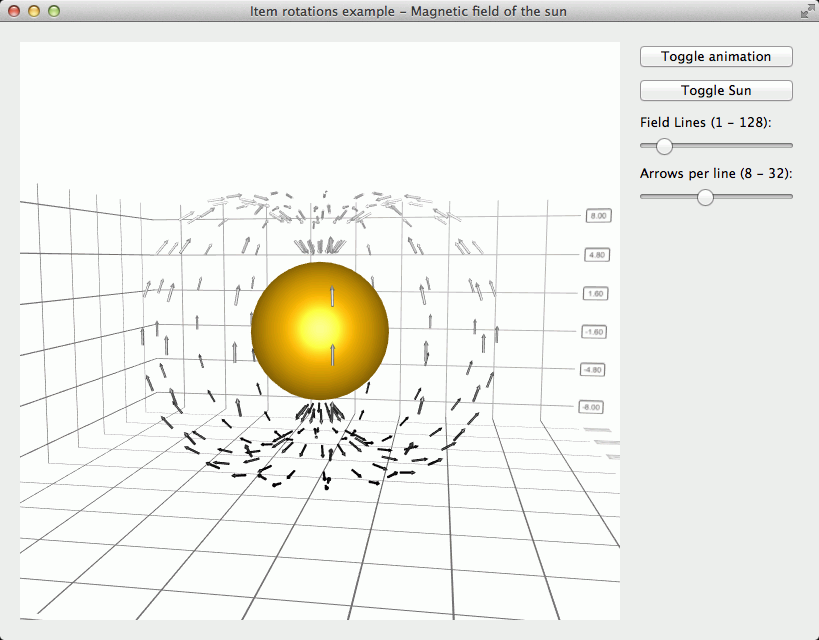
In this example we want to orient the arrow items tangentially to the origin. This requires rotating them, which can be achieved by specifying rotation quaternion to each item:
QQuaternion yRotation = QQuaternion::fromAxisAndAngle(0.0f, 1.0f, 0.0f, horizontalAngle * radiansToDegrees);
QQuaternion zRotation = QQuaternion::fromAxisAndAngle(0.0f, 0.0f, 1.0f, verticalAngle * radiansToDegrees);
QQuaternion totalRotation = yRotation * zRotation;
ptrToDataArray->setRotation(totalRotation);
Since the items need to be rotated along two axes, we define two rotation quaternions, one for Y-axis and one for Z-axis, and then multiply these together to get the total rotation, which we set to the data item.
Using Custom Item Meshes▲
The narrow arrow mesh we use for magnetic field arrow items is not a standard mesh. Instead we supply our own narrowarrow.obj file which contains the object definition for the mesh in Wavefront obj format:
m_magneticField->setMesh(QAbstract3DSeries::MeshUserDefined);
m_magneticField->setUserDefinedMesh(QStringLiteral(":/mesh/narrowarrow.obj"));
Using Range Gradient▲
Setting the color style to range gradient in a series means that the item is colored according to its relative Y-value on the visible Y-coordinate range. We want the arrows on the bottom part of the graph to be darker and gradually get lighter higher they are, so we define a range gradient with black color at the position 0.0 and white color at the position 1.0:
QLinearGradient fieldGradient(0, 0, 16, 1024);
fieldGradient.setColorAt(0.0, Qt::black);
fieldGradient.setColorAt(1.0, Qt::white);
m_magneticField->setBaseGradient(fieldGradient);
m_magneticField->setColorStyle(Q3DTheme::ColorStyleRangeGradient);