


Qt SCXML Media Player Example (Dynamic)▲
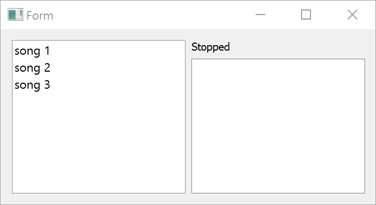
Media Player Example (Dynamic) demonstrates how to access data from a dynamically loaded ECMAScript data model.
The UI is created using Qt Widgets.
Running the Example▲
To run the example from Qt Creator, open the Welcome mode and select the example from Examples. For more information, visit Building and Running an Example.
Using the ECMAScript Data Model▲
We specify the data model as a value of the datamodel attribute of the <scxml> element in mediaplayer-common/mediaplayer.scxml:
<scxml
    xmlns="http://www.w3.org/2005/07/scxml"
    version="1.0"
    name="MediaPlayerStateMachine"
    initial="stopped"
    datamodel="ecmascript"
>
    <datamodel>
        <data id="media"/>
    </datamodel>
Dynamically Loading the State Machine▲
We link against the Qt SCXML module by adding the following line to the project build files.
With qmake to the mediaplayer-widgets-dynamic.pro
QT += widgets scxmlWith cmake to the CMakeLists.txt
find_package(Qt6 REQUIRED COMPONENTS Core Gui Scxml Widgets)

target_link_libraries(mediaplayer-widgets-dynamic PUBLIC
    Qt6::Core
    Qt6::Gui
    Qt6::Scxml
    Qt6::Widgets
)
We dynamically create and instantiate the state machine in mediaplayer-wigdets-dynamic/mediaplayer-widgets-dynamic.cpp:
#include "../mediaplayer-common/mainwindow.h"

#include <QApplication>
#include <QScxmlStateMachine>

int main(int argc, char **argv)
{
    QApplication app(argc, argv);

    auto machine = QScxmlStateMachine::fromFile(
                QStringLiteral(":mediaplayer.scxml"));
    MainWindow mainWindow(machine);
    machine->setParent(&mainWindow);

    machine->start();
    mainWindow.show();
    return app.exec();
}
Connecting to States▲
The media player state machine will send out events when users tap a control and when playback starts or stops, as specified in the SCXML file:
<state id="stopped">
<transition event="tap" cond="isValidMedia()" target="playing"/>
</state>
<state id="playing">
<onentry>
<assign location="media" expr="_event.data.media"/>
<send event="playbackStarted">
<param name="media" expr="media"/>
</send>
</onentry>
<onexit>
<send event="playbackStopped">
<param name="media" expr="media"/>
</send>
</onexit>
<transition event="tap" cond="!isValidMedia() || media === _event.data.media" target="stopped"/>
<transition event="tap" cond="isValidMedia() &amp;&amp; media !== _event.data.media" target="playing"/>
</state>To be notified when a state machine sends out an event, we connect to the corresponding signals:
    stateMachine->connectToEvent("playbackStarted", this, &MainWindow::started);
    stateMachine->connectToEvent("playbackStopped", this, &MainWindow::stopped);