


Quick MQTT Example▲
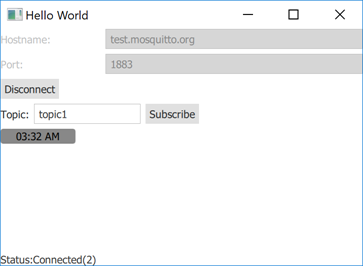
Quick MQTT demonstrates how to register QMqttClient as a QML type and use it in a Qt Quick application.
https:// does not provide a QML API in its current version. However, you can make the C++ classes of the module available to QML.
Creating a Client▲
We create a QmlMqttClient class with the QMqttClient class as a base class:
QmlMqttClient::QmlMqttClient(QObject *parent)
    : QObject(parent)
{
    connect(&m_client, &QMqttClient::hostnameChanged, this, &QmlMqttClient::hostnameChanged);
    connect(&m_client, &QMqttClient::portChanged, this, &QmlMqttClient::portChanged);
    connect(&m_client, &QMqttClient::stateChanged, this, &QmlMqttClient::stateChanged);
}
We use the subscribe() function to create a subscription object:
void QmlMqttClient::connectToHost()
{
    m_client.connectToHost();
}
We connect to QMqttSubscription::messageReceived( ) to receive all messages sent to the broker:
void QmlMqttClient::disconnectFromHost()
{
    m_client.disconnectFromHost();
}
We use an QMqttMessage object to store the payload of a received message:
void QmlMqttSubscription::handleMessage(const QMqttMessage &qmsg)
{
    emit messageReceived(qmsg.payload());
}
Registering Classes in QML▲
In the main.cpp file, we register the QmlMqttClient class as a QML type, MqttClient:
int main(int argc, char *argv[])
{
    QGuiApplication app(argc, argv);
    QQmlApplicationEngine engine;

    QObject::connect(
            &engine, &QQmlApplicationEngine::objectCreationFailed, &app,
            []() { QCoreApplication::exit(EXIT_FAILURE); }, Qt::QueuedConnection);

    engine.loadFromModule(u"subscription"_s, u"Main"_s);

    return QGuiApplication::exec();
}
In addition, we register the QmlMqttSubscription class as an uncreatable type:
We can now use the MqttClient type in the main.qml file to create an MQTT client:
    MqttClient {
        id: client
        hostname: hostnameField.text
        port: portField.text
    }
List of Files▲
Files:
List of Files▲
-
quicksubscription/CMakeLists.txt
-
quicksubscription/Main.qml
-
quicksubscription/main.cpp
-
quicksubscription/qmldir
-
quicksubscription/qmlmqttclient.cpp
-
quicksubscription/qmlmqttclient.h
-
quicksubscription/quicksubscription.pro