


Quick Speech Example▲
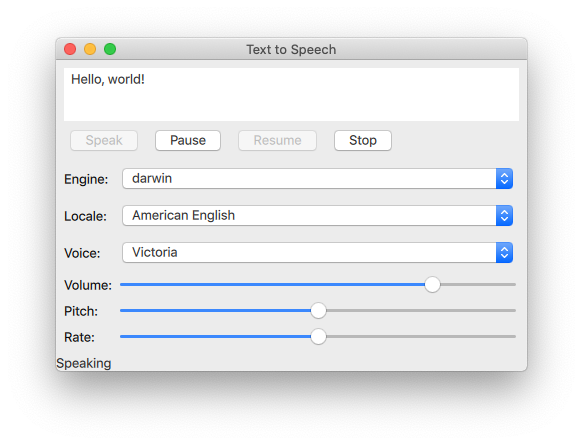
The Quick Speech example demonstrates how the https:// type can be used in a https:// application to read out text and to control the speech.
The example uses https:// to provide controls for the speech's pitch, volume, and rate. It also lets the user select an engine, a language, and a voice.
Initializing a TextToSpeech▲
First, we initialize the text to speech object tts:
    TextToSpeech {
        id: tts
        volume: volumeSlider.value
        pitch: pitchSlider.value
        rate: rateSlider.value
Getting the status▲

Switch cases are used to update the Label statusLabel in the footer.
        onStateChanged: (state) => {
            switch (state) {
                case TextToSpeech.Ready:
                    statusLabel.text = qsTr("Ready")
                    break
                case TextToSpeech.Speaking:
                    statusLabel.text = qsTr("Speaking")
                    break
                case TextToSpeech.Paused:
                    statusLabel.text = qsTr("Paused...")
                    break
                case TextToSpeech.Error:
                    statusLabel.text = qsTr("Error!")
                    break
            }
Highlighting words as they are spoken▲
The https:// input is used to get the text to input and the onSayingWord signal as the trigger and also to know the position to highlight words as they are spoken.
The https:// input is declared here:
Controlling speech▲
https:// types are arranged with a https:// and configured to control the https:// tts.
The speak button▲
When the button is clicked, the available voices on the target devices are retrieved, and tts.voice is set to the currently selected voice of voicesComboBox. Then https://() is called and is passed the text in the inputbox.
The pause, resume, and stop buttons▲
Selecting text to speech options▲
A https:// is used to arrange the controls and labels for the selection of engine, locale, voice, volume, pitch, and rate options for text to speech synthesis.
Selecting engine, locale, and voice▲
A group of https:// components are used for selecting these parameters.
For the engine selection https://, tts.availableEngines() is used as the model.
The onActivated triggers assigning tts.engine the current text at the ComboBoxes current index.
The last two lines in the above code snippet show that the available locales and voices are updated at this point as well, as they are dependent on the selected engine. Those functions are covered in a https://.
The localesComboBox is implemented the same way as engineComboBox, but without updating the available engines.
Selecting volume, pitch, and rate▲
These controls are implemented with https:// as follows:
Updating available options▲
By using the Component.onCompleted signal, the following is done once the root https:// has been instantiated.
-
The enginesComboBox index is set to the currently set engine of tts.
-
The available locales and voices are updated.
-
The current state of tts is signaled.
Used throughout the application, the updateLocales() and updateVoice() functions are implemented as follows:
Running the Example▲
To run the example from https://, open the Welcome mode and select the example from Examples. For more information, visit https://.
Example project▲
https://