


MapCircle QML Type▲
-
Import Statement: import QtLocation 6.6
-
Since: QtLocation 5.5
-
Group: MapCircle is part of https://
Detailed Description▲
The https:// type displays a geographic circle on a Map, which consists of all points that are within a set distance from one central point. Depending on map projection, a geographic circle may not always be a perfect circle on the screen: for instance, in the Mercator projection, circles become ovoid in shape as they near the poles. To display a perfect screen circle around a point, use a https:// containing a relevant Qt Quick type instead.
By default, the circle is displayed as a 1 pixel black border with no fill. To change its appearance, use the https://, https:// and https:// properties.
Internally, a https:// is implemented as a many-sided polygon. To calculate the radius points it uses a spherical model of the Earth, similar to the https:// method of the https:// type. These two things can occasionally have implications for the accuracy of the circle's shape, depending on position and map projection.
Dragging a https:// (through the use of https:// or https://) causes new points to be generated at the same distance (in meters) from the center. This is in contrast to other map items which store their dimensions in terms of latitude and longitude differences between vertices.
Example Usage▲
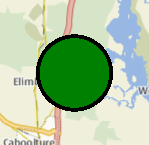
The following snippet shows a map containing a https://, centered at the coordinate (-27, 153) with a radius of 5km. The circle is filled in green, with a 3 pixel black border.
Map {
    MapCircle {
        center {
            latitude: -27.5
            longitude: 153.0
        }
        radius: 5000.0
        color: 'green'
        border.width: 3
    }
}
Property Documentation▲
autoFadeIn : bool▲
This property holds whether the item automatically fades in when zooming into the map starting from very low zoom levels. By default this is true. Setting this property to false causes the map item to always have the opacity specified with the https:// property, which is 1.0 by default.
border group▲
border.color : color
border.width : int
This property is part of the border group property. The border property holds the width and color used to draw the border of the circle. The width is in pixels and is independent of the zoom level of the map.
The default values correspond to a black border with a width of 1 pixel. For no line, use a width of 0 or a transparent color.
center : coordinate▲
This property holds the central point about which the circle is defined.
See Also▲
See also https://
color : color▲
This property holds the fill color of the circle when drawn. For no fill, use a transparent color.
opacity : real▲
This property holds the opacity of the item. Opacity is specified as a number between 0 (fully transparent) and 1 (fully opaque). The default is 1.
An item with 0 opacity will still receive mouse events. To stop mouse events, set the visible property of the item to false.
radius : real▲
[since 6.5] referenceSurface : enum▲
This property determines the reference surface of the circle. If it is set to QLocation::ReferenceSurface::Map the circle is drawn as a circe on the map with https:// approximated to match the map scale at the center of the circle. If it is set to QLocation::ReferenceSurface::Globe the circle is mapped onto a sphere and the great circle path is used to determine the coverage of the circle. Default value is QLocation::ReferenceSurface::Map.
This property was introduced in Qt 6.5.