


QPixmap Class▲
-
Header: QPixmap
-
CMake:
find_package(Qt6 REQUIRED COMPONENTS Gui)
target_link_libraries(mytarget PRIVATE Qt6::Gui)
-
qmake: QT += gui
-
Inherits: https://
-
Inherited By: https://
-
Group: QPixmap is part of https://, shared
Detailed Description▲
Qt provides four classes for handling image data: https://, https://, https:// and https://. https:// is designed and optimized for I/O, and for direct pixel access and manipulation, while https:// is designed and optimized for showing images on screen. https:// is only a convenience class that inherits https://, ensuring a depth of 1. The https://() function returns true if a https:// object is really a bitmap, otherwise returns false. Finally, the https:// class is a paint device that records and replays https:// commands.
A https:// can easily be displayed on the screen using https:// or one of https://'s subclasses (such as https:// and https://). https:// has a pixmap property, whereas https:// has an icon property.
https:// objects can be passed around by value since the https:// class uses implicit data sharing. For more information, see the https:// documentation. https:// objects can also be streamed.
Note that the pixel data in a pixmap is internal and is managed by the underlying window system. Because https:// is a https:// subclass, https:// can be used to draw directly onto pixmaps. Pixels can only be accessed through https:// functions or by converting the https:// to a https://. However, the https://() function is available for initializing the entire pixmap with a given color.
There are functions to convert between https:// and https://. Typically, the https:// class is used to load an image file, optionally manipulating the image data, before the https:// object is converted into a https:// to be shown on screen. Alternatively, if no manipulation is desired, the image file can be loaded directly into a https://.
https:// provides a collection of functions that can be used to obtain a variety of information about the pixmap. In addition, there are several functions that enables transformation of the pixmap.
Reading and Writing Image Files▲
https:// provides several ways of reading an image file: The file can be loaded when constructing the https:// object, or by using the https://() or https://() functions later on. When loading an image, the file name can either refer to an actual file on disk or to one of the application's embedded resources. See https:// overview for details on how to embed images and other resource files in the application's executable.
Simply call the https://() function to save a https:// object.
The complete list of supported file formats are available through the https://() and https://() functions. New file formats can be added as plugins. By default, Qt supports the following formats:
|
Format |
Description |
Qt's support |
|---|---|---|
|
BMP |
Windows Bitmap |
Read/write |
|
GIF |
Graphic Interchange Format (optional) |
Read |
|
JPG |
Joint Photographic Experts Group |
Read/write |
|
JPEG |
Joint Photographic Experts Group |
Read/write |
|
PNG |
Portable Network Graphics |
Read/write |
|
PBM |
Portable Bitmap |
Read |
|
PGM |
Portable Graymap |
Read |
|
PPM |
Portable Pixmap |
Read/write |
|
XBM |
X11 Bitmap |
Read/write |
|
XPM |
X11 Pixmap |
Read/write |
Pixmap Information▲
https:// provides a collection of functions that can be used to obtain a variety of information about the pixmap:
|
Available Functions |
|
|---|---|
|
Geometry |
The https://(), https://() and https://() functions provide information about the pixmap's size. The https://() function returns the image's enclosing rectangle. |
|
Alpha component |
The hasAlphaChannel() returns true if the pixmap has a format that respects the alpha channel, otherwise returns false. The hasAlpha(), https://() and https://() functions are legacy and should not be used. They are potentially very slow. The https://() function creates and returns a 1-bpp heuristic mask (i.e. a https://) for this pixmap. It works by selecting a color from one of the corners and then chipping away pixels of that color, starting at all the edges. The https://() function creates and returns a mask (i.e. a https://) for the pixmap based on a given color. |
|
Low-level information |
The https://() function returns the depth of the pixmap. The defaultDepth() function returns the default depth, i.e. the depth used by the application on the given screen. The https://() function returns a number that uniquely identifies the contents of the https:// object. |
Pixmap Conversion▲
A https:// object can be converted into a https:// using the https://() function. Likewise, a https:// can be converted into a https:// using the https://(). If this is too expensive an operation, you can use https://() instead.
To convert a https:// to and from HICON you can use the https://() and https://() functions respectively (after converting the https:// to a https://, as explained above).
Pixmap Transformations▲
https:// supports a number of functions for creating a new pixmap that is a transformed version of the original:
The https://(), https://() and https://() functions return scaled copies of the pixmap, while the https://() function creates a https:// that is a plain copy of the original one.
The transformed() function returns a copy of the pixmap that is transformed with the given transformation matrix and transformation mode: Internally, the transformation matrix is adjusted to compensate for unwanted translation, i.e. transformed() returns the smallest pixmap containing all transformed points of the original pixmap. The static https://() function returns the actual matrix used for transforming the pixmap.
See Also▲
See also https://, https://, https://, https://
Member Function Documentation▲
QPixmap::QPixmap()▲
QPixmap::QPixmap(int width, int height)▲
Constructs a pixmap with the given width and height. If either width or height is zero, a null pixmap is constructed.
This will create a https:// with uninitialized data. Call https://() to fill the pixmap with an appropriate color before drawing onto it with https://.
See Also▲
See also https://()
[explicit] QPixmap::QPixmap(const QSize &size)▲
This is an overloaded function.
Constructs a pixmap of the given size.
This will create a https:// with uninitialized data. Call https://() to fill the pixmap with an appropriate color before drawing onto it with https://.
QPixmap::QPixmap(const QString &fileName, const char *format = nullptr, Qt::ImageConversionFlags flags = Qt::AutoColor)▲
Constructs a pixmap from the file with the given fileName. If the file does not exist or is of an unknown format, the pixmap becomes a null pixmap.
The loader attempts to read the pixmap using the specified format. If the format is not specified (which is the default), the loader probes the file for a header to guess the file format.
The file name can either refer to an actual file on disk or to one of the application's embedded resources. See the https:// overview for details on how to embed images and other resource files in the application's executable.
If the image needs to be modified to fit in a lower-resolution result (e.g. converting from 32-bit to 8-bit), use the flags to control the conversion.
The fileName, format and flags parameters are passed on to https://(). This means that the data in fileName is not compiled into the binary. If fileName contains a relative path (e.g. the filename only) the relevant file must be found relative to the runtime working directory.
See Also▲
See also https://
[explicit] QPixmap::QPixmap(const char *const[] xpm)▲
Constructs a pixmap from the given xpm data, which must be a valid XPM image.
Errors are silently ignored.
Note that it's possible to squeeze the XPM variable a little bit by using an unusual declaration:
static const char * const start_xpm[] = {
    "16 15 8 1",
    "a c #cec6bd",
    // etc.
};
The extra const makes the entire definition read-only, which is slightly more efficient (for example, when the code is in a shared library) and ROMable when the application is to be stored in ROM.
QPixmap::QPixmap(const QPixmap &pixmap)▲
QPixmap::QPixmap(QPixmap &&other)▲
[virtual] QPixmap::~QPixmap()▲
Destroys the pixmap.
qint64 QPixmap::cacheKey() const▲
Returns a number that identifies this https://. Distinct https:// objects can only have the same cache key if they refer to the same contents.
The cacheKey() will change when the pixmap is altered.
bool QPixmap::convertFromImage(const QImage &image, Qt::ImageConversionFlags flags = Qt::AutoColor)▲
Replaces this pixmap's data with the given image using the specified flags to control the conversion. The flags argument is a bitwise-OR of the https://. Passing 0 for flags sets all the default options. Returns true if the result is that this pixmap is not null.
Note: this function was part of Qt 3 support in Qt 4.6 and earlier. It has been promoted to official API status in 4.7 to support updating the pixmap's image without creating a new https:// as https://() would.
See Also▲
See also https://()
QPixmap QPixmap::copy(const QRect &rectangle = QRect()) const▲
Returns a deep copy of the subset of the pixmap that is specified by the given rectangle. For more information on deep copies, see the https:// documentation.
If the given rectangle is empty, the whole image is copied.
See Also▲
See also https://(), https://(), https://
QPixmap QPixmap::copy(int x, int y, int width, int height) const▲
This is an overloaded function.
Returns a deep copy of the subset of the pixmap that is specified by the rectangle https://( x, y, width, height).
QBitmap QPixmap::createHeuristicMask(bool clipTight = true) const▲
Creates and returns a heuristic mask for this pixmap.
The function works by selecting a color from one of the corners and then chipping away pixels of that color, starting at all the edges. If clipTight is true (the default) the mask is just large enough to cover the pixels; otherwise, the mask is larger than the data pixels.
The mask may not be perfect but it should be reasonable, so you can do things such as the following:
QPixmap myPixmap;
myPixmap.setMask(myPixmap.createHeuristicMask());
This function is slow because it involves converting to/from a https://, and non-trivial computations.
See Also▲
See also QImage::createHeuristicMask(), https://()
QBitmap QPixmap::createMaskFromColor(const QColor &maskColor, Qt::MaskMode mode = Qt::MaskInColor) const▲
Creates and returns a mask for this pixmap based on the given maskColor. If the mode is https://, all pixels matching the maskColor will be transparent. If mode is https://, all pixels matching the maskColor will be opaque.
This function is slow because it involves converting to/from a https://.
See Also▲
See also https://(), QImage::createMaskFromColor()
int QPixmap::depth() const▲
Returns the depth of the pixmap.
The pixmap depth is also called bits per pixel (bpp) or bit planes of a pixmap. A null pixmap has depth 0.
See Also▲
See also defaultDepth(), https://
[since 6.2] QSizeF QPixmap::deviceIndependentSize() const▲
Returns the size of the pixmap in device independent pixels.
This value should be used when using the pixmap size in user interface size calculations.
The return value is equivalent to pixmap.https://() / pixmap.https://().
This function was introduced in Qt 6.2.
qreal QPixmap::devicePixelRatio() const▲
Returns the device pixel ratio for the pixmap. This is the ratio between device pixels and device independent pixels.
Use this function when calculating layout geometry based on the pixmap size: https:// layoutSize = image.https://() / image.devicePixelRatio()
The default value is 1.0.
See Also▲
See also https://(), https://
void QPixmap::fill(const QColor &color = Qt::white)▲
Fills the pixmap with the given color.
The effect of this function is undefined when the pixmap is being painted on.
See Also▲
See also https://
[static] QPixmap QPixmap::fromImage(const QImage &image, Qt::ImageConversionFlags flags = Qt::AutoColor)▲
Converts the given image to a pixmap using the specified flags to control the conversion. The flags argument is a bitwise-OR of the https://. Passing 0 for flags sets all the default options.
In case of monochrome and 8-bit images, the image is first converted to a 32-bit pixmap and then filled with the colors in the color table. If this is too expensive an operation, you can use https://() instead.
See Also▲
See also https://(), https://(), https://
[static] QPixmap QPixmap::fromImage(QImage &&image, Qt::ImageConversionFlags flags = Qt::AutoColor)▲
This is an overloaded function.
Converts the given image to a pixmap without copying if possible.
[static] QPixmap QPixmap::fromImageReader(QImageReader *imageReader, Qt::ImageConversionFlags flags = Qt::AutoColor)▲
Create a https:// from an image read directly from an imageReader. The flags argument is a bitwise-OR of the https://. Passing 0 for flags sets all the default options.
On some systems, reading an image directly to https:// can use less memory than reading a https:// to convert it to https://.
See Also▲
See also https://(), https://(), https://
int QPixmap::height() const▲
bool QPixmap::isNull() const▲
Returns true if this is a null pixmap; otherwise returns false.
A null pixmap has zero width, zero height and no contents. You cannot draw in a null pixmap.
bool QPixmap::isQBitmap() const▲
Returns true if this is a https://; otherwise returns false.
bool QPixmap::load(const QString &fileName, const char *format = nullptr, Qt::ImageConversionFlags flags = Qt::AutoColor)▲
Loads a pixmap from the file with the given fileName. Returns true if the pixmap was successfully loaded; otherwise invalidates the pixmap and returns false.
The loader attempts to read the pixmap using the specified format. If the format is not specified (which is the default), the loader probes the file for a header to guess the file format.
The file name can either refer to an actual file on disk or to one of the application's embedded resources. See the https:// overview for details on how to embed pixmaps and other resource files in the application's executable.
If the data needs to be modified to fit in a lower-resolution result (e.g. converting from 32-bit to 8-bit), use the flags to control the conversion.
Note that QPixmaps are automatically added to the https:// when loaded from a file in main thread; the key used is internal and cannot be acquired.
See Also▲
See also https://(), https://
bool QPixmap::loadFromData(const uchar *data, uint len, const char *format = nullptr, Qt::ImageConversionFlags flags = Qt::AutoColor)▲
Loads a pixmap from the len first bytes of the given binary data. Returns true if the pixmap was loaded successfully; otherwise invalidates the pixmap and returns false.
The loader attempts to read the pixmap using the specified format. If the format is not specified (which is the default), the loader probes the file for a header to guess the file format.
If the data needs to be modified to fit in a lower-resolution result (e.g. converting from 32-bit to 8-bit), use the flags to control the conversion.
See Also▲
See also https://(), https://
bool QPixmap::loadFromData(const QByteArray &data, const char *format = nullptr, Qt::ImageConversionFlags flags = Qt::AutoColor)▲
This is an overloaded function.
Loads a pixmap from the binary data using the specified format and conversion flags.
QBitmap QPixmap::mask() const▲
Extracts a bitmap mask from the pixmap's alpha channel.
This is potentially an expensive operation. The mask of the pixmap is extracted dynamically from the pixeldata.
See Also▲
See also https://(), https://
QRect QPixmap::rect() const▲
bool QPixmap::save(const QString &fileName, const char *format = nullptr, int quality = -1) const▲
Saves the pixmap to the file with the given fileName using the specified image file format and quality factor. Returns true if successful; otherwise returns false.
The quality factor must be in the range [0,100] or -1. Specify 0 to obtain small compressed files, 100 for large uncompressed files, and -1 to use the default settings.
If format is nullptr, an image format will be chosen from fileName's suffix.
See Also▲
See also https://
bool QPixmap::save(QIODevice *device, const char *format = nullptr, int quality = -1) const▲
This is an overloaded function.
This function writes a https:// to the given device using the specified image file format and quality factor. This can be used, for example, to save a pixmap directly into a https://:
QPixmap pixmap;
QByteArray bytes;
QBuffer buffer(&bytes);
buffer.open(QIODevice::WriteOnly);
pixmap.save(&buffer, "PNG"); // writes pixmap into bytes in PNG format
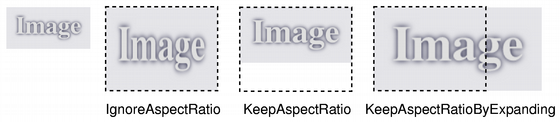
QPixmap QPixmap::scaled(const QSize &size, Qt::AspectRatioMode aspectRatioMode = Qt::IgnoreAspectRatio, Qt::TransformationMode transformMode = Qt::FastTransformation) const▲
Scales the pixmap to the given size, using the aspect ratio and transformation modes specified by aspectRatioMode and transformMode.
-
If aspectRatioMode is https://, the pixmap is scaled to size.
-
If aspectRatioMode is https://, the pixmap is scaled to a rectangle as large as possible inside size, preserving the aspect ratio.
-
If aspectRatioMode is https://, the pixmap is scaled to a rectangle as small as possible outside size, preserving the aspect ratio.
If the given size is empty, this function returns a null pixmap.
In some cases it can be more beneficial to draw the pixmap to a painter with a scale set rather than scaling the pixmap. This is the case when the painter is for instance based on OpenGL or when the scale factor changes rapidly.
See Also▲
See also https://(), https://
QPixmap QPixmap::scaled(int width, int height, Qt::AspectRatioMode aspectRatioMode = Qt::IgnoreAspectRatio, Qt::TransformationMode transformMode = Qt::FastTransformation) const▲
This is an overloaded function.
Returns a copy of the pixmap scaled to a rectangle with the given width and height according to the given aspectRatioMode and transformMode.
If either the width or the height is zero or negative, this function returns a null pixmap.
QPixmap QPixmap::scaledToHeight(int height, Qt::TransformationMode mode = Qt::FastTransformation) const▲
Returns a scaled copy of the image. The returned image is scaled to the given height using the specified transformation mode. The width of the pixmap is automatically calculated so that the aspect ratio of the pixmap is preserved.
If height is 0 or negative, a null pixmap is returned.
See Also▲
See also https://(), https://
QPixmap QPixmap::scaledToWidth(int width, Qt::TransformationMode mode = Qt::FastTransformation) const▲
Returns a scaled copy of the image. The returned image is scaled to the given width using the specified transformation mode. The height of the pixmap is automatically calculated so that the aspect ratio of the pixmap is preserved.
If width is 0 or negative, a null pixmap is returned.
See Also▲
See also https://(), https://
void QPixmap::scroll(int dx, int dy, int x, int y, int width, int height, QRegion *exposed = nullptr)▲
This convenience function is equivalent to calling QPixmap::scroll(dx, dy, https://(x, y, width, height), exposed).
See Also▲
See also https://(), https://()
void QPixmap::scroll(int dx, int dy, const QRect &rect, QRegion *exposed = nullptr)▲
Scrolls the area rect of this pixmap by (dx, dy). The exposed region is left unchanged. You can optionally pass a pointer to an empty https:// to get the region that is exposed by the scroll operation.
QPixmap pixmap("background.png");
QRegion exposed;
pixmap.scroll(10, 10, pixmap.rect(), &exposed);
You cannot scroll while there is an active painter on the pixmap.
See Also▲
See also https://(), https://()
void QPixmap::setDevicePixelRatio(qreal scaleFactor)▲
Sets the device pixel ratio for the pixmap. This is the ratio between image pixels and device-independent pixels.
The default scaleFactor is 1.0. Setting it to something else has two effects:
QPainters that are opened on the pixmap will be scaled. For example, painting on a 200x200 image if with a ratio of 2.0 will result in effective (device-independent) painting bounds of 100x100.
Code paths in Qt that calculate layout geometry based on the pixmap size will take the ratio into account: https:// layoutSize = pixmap.https://() / pixmap.https://() The net effect of this is that the pixmap is displayed as high-DPI pixmap rather than a large pixmap (see https://).
See Also▲
See also https://(), https://()
void QPixmap::setMask(const QBitmap &mask)▲
Sets a mask bitmap.
This function merges the mask with the pixmap's alpha channel. A pixel value of 1 on the mask means the pixmap's pixel is unchanged; a value of 0 means the pixel is transparent. The mask must have the same size as this pixmap.
Setting a null mask resets the mask, leaving the previously transparent pixels black. The effect of this function is undefined when the pixmap is being painted on.
This is potentially an expensive operation.
See Also▲
See also https://(), https://, https://
QSize QPixmap::size() const▲
void QPixmap::swap(QPixmap &other)▲
Swaps pixmap other with this pixmap. This operation is very fast and never fails.
QImage QPixmap::toImage() const▲
Converts the pixmap to a https://. Returns a null image if the conversion fails.
If the pixmap has 1-bit depth, the returned image will also be 1 bit deep. Images with more bits will be returned in a format closely represents the underlying system. Usually this will be https:// for pixmaps with an alpha and https:// or https:// for pixmaps without alpha.
Note that for the moment, alpha masks on monochrome images are ignored.
See Also▲
See also https://(), https://
[static] QTransform QPixmap::trueMatrix(const QTransform &matrix, int width, int height)▲
Returns the actual matrix used for transforming a pixmap with the given width, height and matrix.
When transforming a pixmap using the transformed() function, the transformation matrix is internally adjusted to compensate for unwanted translation, i.e. transformed() returns the smallest pixmap containing all transformed points of the original pixmap. This function returns the modified matrix, which maps points correctly from the original pixmap into the new pixmap.
See Also▲
See also transformed(), https://
int QPixmap::width() const▲
QVariant QPixmap::operator QVariant() const▲
Returns the pixmap as a https://.
bool QPixmap::operator!() const▲
QPixmap &QPixmap::operator=(const QPixmap &pixmap)▲
Assigns the given pixmap to this pixmap and returns a reference to this pixmap.
See Also▲
See also https://(), https://()
QPixmap &QPixmap::operator=(QPixmap &&other)▲
Move-assigns other to this https:// instance.
Related Non-Members▲
QDataStream &operator<<(QDataStream &stream, const QPixmap &pixmap)▲
Writes the given pixmap to the given stream as a PNG image. Note that writing the stream to a file will not produce a valid image file.
See Also▲
See also https://(), https://