


Qt Quick 3D - Antialiasing Example▲
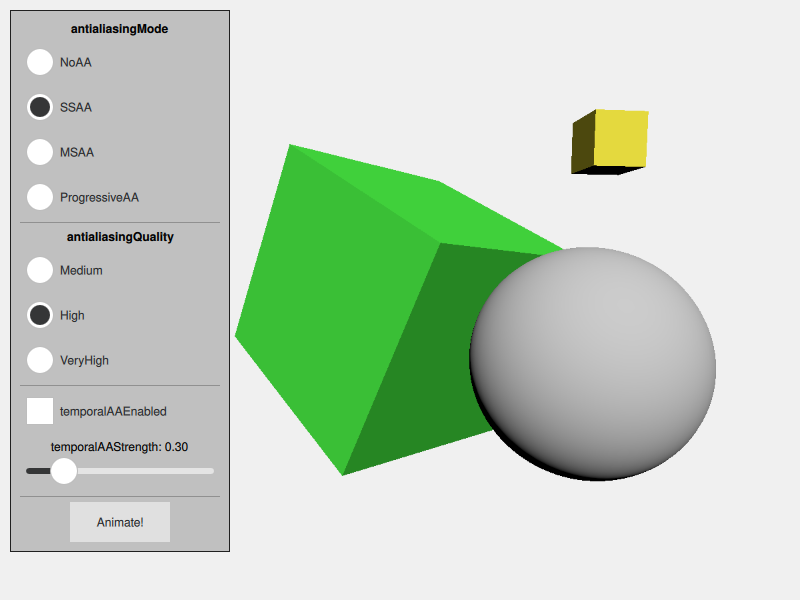
The Antialiasing example demonstrates how to control antialiasing in Qt Quick 3D. It shows a simple scene that exhibits antialiasing artifacts. There is a simple Qt Quick user interface that allows choosing between the antialiasing types, and setting the options that control them.
The test scene▲
This example shows a simple scene that contains a sphere and two rotated cubes. The scene is set up so that it clearly shows jagged edges when antialiasing is not enabled.
Controlling antialiasing▲
Antialiasing is controlled by the https:// object. The values are set based on the selection made in the user interface.
The https:// can be set to NoAA to disable antialiasing, or to one of the following:
-
SSAA for supersample antialiasing
-
MSAA for multisample antialiasing
-
ProgressiveAA for progressive antialiasing
The https:// can be set to Medium, High, or VeryHigh.
In addition, https:// can be enabled independently.
     environment: SceneEnvironment {
         id: sceneEnvironment
         clearColor: "#f0f0f0"
         backgroundMode: SceneEnvironment.Color

         antialiasingMode: modeButton1.checked ? SceneEnvironment.NoAA : modeButton2.checked
                                                 ? SceneEnvironment.SSAA : modeButton3.checked
                                                   ? SceneEnvironment.MSAA : SceneEnvironment.ProgressiveAA

         antialiasingQuality: qualityButton1.checked ? SceneEnvironment.Medium : qualityButton2.checked
                                                       ? SceneEnvironment.High : SceneEnvironment.VeryHigh
         temporalAAEnabled: temporalModeButton.checked
         temporalAAStrength: temporalStrengthSlider.value
     }
See the https:// page in the asset conditioning section for further discussion on antialiasing.
List of Files▲
Files:
List of Files▲
-
antialiasing/CMakeLists.txt
-
antialiasing/antialiasing.pro
-
antialiasing/main.cpp
-
antialiasing/main.qml
-
antialiasing/qml.qrc