


Qt Quick 3D - Instanced Rendering Example▲
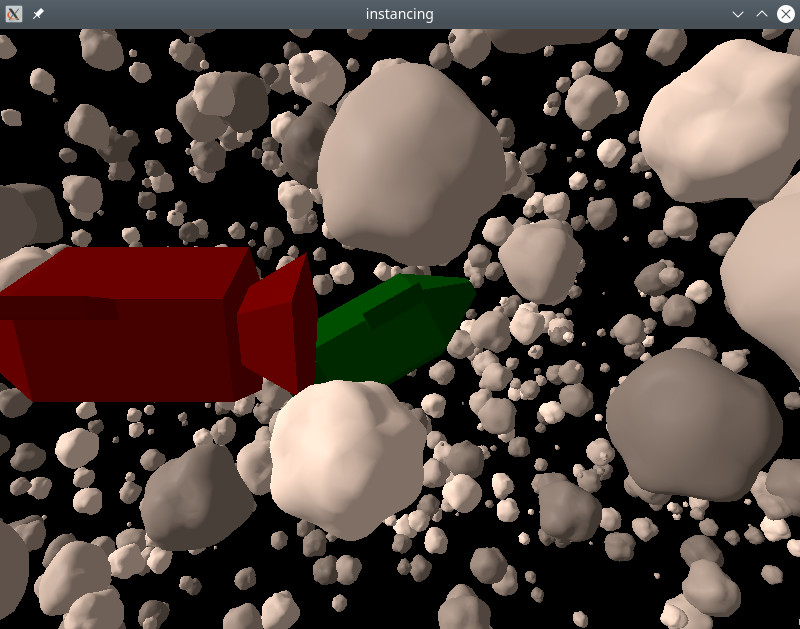
This example shows how do instanced rendering using the basic QML API.
The spaceship and asteroid models were created using the Blender 3D modeling tool, and imported with https://.
Random instancing▲
We use https:// to make a random table that defines our asteroid field:
RandomInstancing {
    id: randomInstancing
    instanceCount: 1500

    position: InstanceRange {
        from: Qt.vector3d(-300, -200, -500)
        to: Qt.vector3d(300, 200, 200)
    }
    scale: InstanceRange {
        from: Qt.vector3d(1, 1, 1)
        to: Qt.vector3d(10, 10, 10)
        proportional: true
    }
    rotation: InstanceRange {
        from: Qt.vector3d(0, 0, 0)
        to: Qt.vector3d(360, 360, 360)
    }
    color: InstanceRange {
        from: "grey"
        to: "white"
        proportional: true
    }

    randomSeed: 2021
}
Position and rotation are allowed to vary freely. Scaling is set to be uniform in all directions and colors are grayscale. This is done by setting the https:// attribute.
The spaceships are placed manually using https://:
InstanceListEntry {
    id: redShip
    position: Qt.vector3d(50, 10, 100)
    eulerRotation: Qt.vector3d(0, 180, 0)
    color: "red"
    NumberAnimation on position.x {
        from: 50
        to: -70
        duration: 8000
    }
}

InstanceListEntry {
    id: greenShip
    position: Qt.vector3d(0, 0, -60)
    eulerRotation: Qt.vector3d(-10, 0, 30)
    color: "green"
}

InstanceListEntry {
    id: blueShip
    position: Qt.vector3d(-100, -100, 0)
    color: "blue"
}

InstanceList {
    id: manualInstancing
    instances: [ redShip, greenShip, blueShip ]
}
The properties of https:// are bindable: here we animate the red ship so it crosses the path of the camera.
Finally we apply the instancing tables to the objects:
Asteroid {
    instancing: randomInstancing
    NumberAnimation on eulerRotation.x {
        from: 0
        to: 360
        duration: 11000
        loops: Animation.Infinite
    }
}

SimpleSpaceship {
    instancing: manualInstancing
}
By animating the rotation of the asteroid model, all of the instances will rotate without having to change the contents of the instance table. Since the asteroid instances have random rotations, all the asteroids will rotate around different axes.
List of Files▲
Files:
List of Files▲
-
instancing/Asteroid.qml
-
instancing/CMakeLists.txt
-
instancing/SimpleSpaceship.qml
-
instancing/instancing.pro
-
instancing/main.cpp
-
instancing/main.qml
-
instancing/qml.qrc