


Qt Quick 3D - Lights Example▲
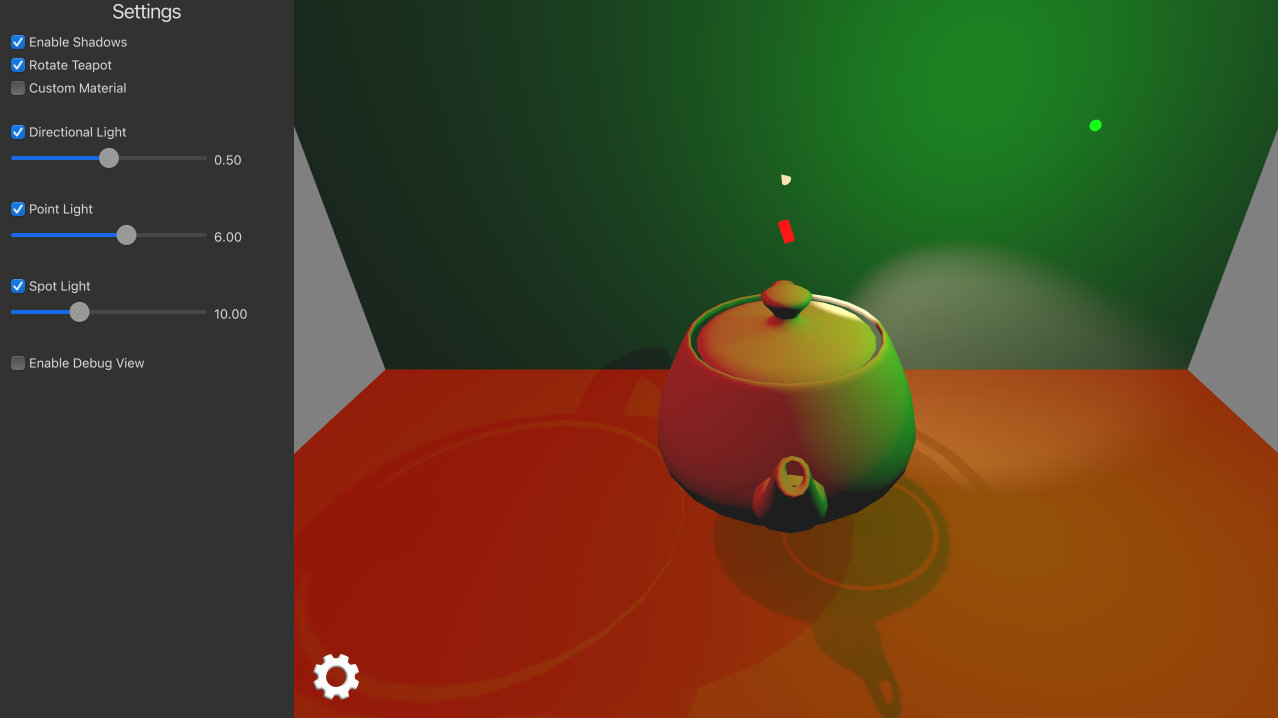
This example demonstrates using three different light types in an application.
Setting the Scene Lights▲
Directional Light▲
The directional light emits light in one direction from an unidentifiable source located infinitely far away. This is similar to the way sunlight works in real life. A directional light has infinite range and does not diminish.
We setup directional light to emit red color and animate its rotation around x-axis.
DirectionalLight {
    id: light1
    color: Qt.rgba(1.0, 0.1, 0.1, 1.0)
    ambientColor: Qt.rgba(0.1, 0.1, 0.1, 1.0)
    position: Qt.vector3d(0, 200, 0)
    rotation: Quaternion.fromEulerAngles(-135, -90, 0)
    shadowMapQuality: Light.ShadowMapQualityHigh
    visible: directionalLightCheckBox.checked
    castsShadow: checkBoxShadows.checked
    brightness: directionalLightSlider.value
    SequentialAnimation on rotation {
        loops: Animation.Infinite
        QuaternionAnimation {
            to: Quaternion.fromEulerAngles(-45, -90, 0)
            duration: 2000
            easing.type: Easing.InOutQuad
        }
        QuaternionAnimation {
            to: Quaternion.fromEulerAngles(-135, -90, 0)
            duration: 2000
            easing.type: Easing.InOutQuad
        }
    }
}
Point Light▲
The point light can be described as a sphere, emitting light with equal strength in all directions from the center of the light. This is similar to the way a light bulb emits light.
We setup point light to emit green color and animate its position in x-coordinate.
PointLight {
    id: light2
    color: Qt.rgba(0.1, 1.0, 0.1, 1.0)
    ambientColor: Qt.rgba(0.1, 0.1, 0.1, 1.0)
    position: Qt.vector3d(0, 300, 0)
    shadowMapFar: 2000
    shadowMapQuality: Light.ShadowMapQualityHigh
    visible: pointLightCheckBox.checked
    castsShadow: checkBoxShadows.checked
    brightness: pointLightSlider.value
    SequentialAnimation on x {
        loops: Animation.Infinite
        NumberAnimation {
            to: 400
            duration: 2000
            easing.type: Easing.InOutQuad
        }
        NumberAnimation {
            to: 0
            duration: 2000
            easing.type: Easing.InOutQuad
        }
    }
}
Spot Light▲
The spot light is similar to the point light, except that it emits light in a cone shape towards one direction instead of all directions. Aside from the cone angle, a spot light has the same characteristics and properties as the point light.
We setup spot light to emit a warm color and animate its rotation in y-coordinate.
SpotLight {
    id: light4
    color: Qt.rgba(1.0, 0.9, 0.7, 1.0)
    ambientColor: Qt.rgba(0.0, 0.0, 0.0, 0.0)
    position: Qt.vector3d(0, 250, 0)
    eulerRotation.x: -45
    shadowMapFar: 2000
    shadowMapQuality: Light.ShadowMapQualityHigh
    visible: spotLightCheckBox.checked
    castsShadow: checkBoxShadows.checked
    brightness: spotLightSlider.value
    coneAngle: 50
    innerConeAngle: 30
    PropertyAnimation on eulerRotation.y {
        loops: Animation.Infinite
        from: 0
        to: -360
        duration: 10000
    }
}
Setting the Scene Models▲
First we add two rectangle models to act as the floor and the back wall for our scene. These are useful for seeing light shadows.
Model {
    source: "#Rectangle"
    y: -200
    scale: Qt.vector3d(15, 15, 15)
    eulerRotation.x: -90
    materials: [
        DefaultMaterial {
            diffuseColor: Qt.rgba(0.8, 0.6, 0.4, 1.0)
        }
    ]
}
Model {
    source: "#Rectangle"
    z: -400
    scale: Qt.vector3d(15, 15, 15)
    materials: [
        DefaultMaterial {
            diffuseColor: Qt.rgba(0.8, 0.8, 0.9, 1.0)
        }
    ]
}
Then we add our main teapot model which is rotated around y-axis.
Model {
    id: teapotDefault
    source: "teapot.mesh"
    y: -100
    scale: Qt.vector3d(75, 75, 75)

    property variant material
    materials: [ material ]

    property bool animate: true
    NumberAnimation on eulerRotation.y {
        running: teapotDefault.animate
        loops: Animation.Infinite
        duration: 5000
        from: 0
        to: -360
    }
}
We also add small cube models to demonstrate position & rotation of each light type. These cubes scale bigger when user is accessing related sliders.
Model {
    // Directional Light Marker
    property