


MapPolygon QML Type▲
-
Import Statement: import QtLocation 6.7
-
Since: QtLocation 5.5
-
Group: MapPolygon is part of https://
Detailed Description▲
The https:// type displays a polygon on a Map, specified in terms of an ordered list of https://. For best appearance and results, polygons should be simple (not self-intersecting).
The https:// on the path cannot be directly changed after being added to the Polygon. Instead, copy the https:// into a var, modify the copy and reassign the copy back to the https://.
var path = mapPolygon.path;
path[0].latitude = 5;
mapPolygon.path = path;
Coordinates can also be added and removed at any time using the https:// and https:// methods.
For drawing rectangles with "straight" edges (same latitude across one edge, same latitude across the other), the https:// type provides a simpler, two-point API.
By default, the polygon is displayed as a 1 pixel black border with no fill. To change its appearance, use the https://, https:// and https:// properties.
Since MapPolygons are geographic items, dragging a https:// (through the use of https:// or https://) causes its vertices to be recalculated in the geographic coordinate space. The edges retain the same geographic lengths (latitude and longitude differences between the vertices), but they remain straight. Apparent stretching of the item occurs when dragged to a different latitude.
Example Usage▲
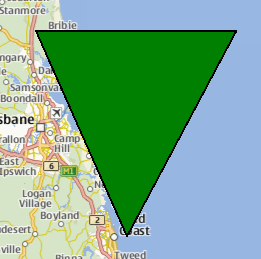
The following snippet shows a https:// being used to display a triangle, with three vertices near Brisbane, Australia. The triangle is filled in green, with a 1 pixel black border.
Map {
    MapPolygon {
        color: 'green'
        path: [
            { latitude: -27, longitude: 153.0 },
            { latitude: -27, longitude: 154.1 },
            { latitude: -28, longitude: 153.5 }
        ]
    }
}
Property Documentation▲
autoFadeIn : bool▲
This property holds whether the item automatically fades in when zooming into the map starting from very low zoom levels. By default this is true. Setting this property to false causes the map item to always have the opacity specified with the https:// property, which is 1.0 by default.
border group▲
border.color : color
border.width : int
This property is part of the border property group. The border property group holds the width and color used to draw the border of the polygon.
The width is in pixels and is independent of the zoom level of the map.
The default values correspond to a black border with a width of 1 pixel. For no line, use a width of 0 or a transparent color.
color : color▲
This property holds the color used to fill the polygon.
The default value is transparent.
path : list<coordinate>▲
This property holds the ordered list of coordinates which define the polygon. Having less than 3 different coordinates in the path results in undefined behavior.
See Also▲
See also https://, https://
[since 6.5] referenceSurface : enum▲
This property determines the reference surface of the polygon. If it is set to QLocation::ReferenceSurface::Map the polygons vertices are connected with straight lines on the map. If it is set to QLocation::ReferenceSurface::Globe, the vertices are connected following the great circle path, describing the shortest connection of two points on a sphere. Default value is QLocation::ReferenceSurface::Map.
This property was introduced in Qt 6.5.