


QGraphicsLineItem Class▲
-
Header: QGraphicsLineItem
-
CMake:
find_package(Qt6 REQUIRED COMPONENTS Widgets)
target_link_libraries(mytarget PRIVATE Qt6::Widgets)
-
qmake: QT += widgets
-
Inherits: QGraphicsItem
-
Inherited By:
-
Group: QGraphicsLineItem is part of graphicsview-api
Detailed Description▲
To set the item's line, pass a QLineF to QGraphicsLineItem's constructor, or call the setLine() function. The line() function returns the current line. By default the line is black with a width of 0, but you can change this by calling setPen().
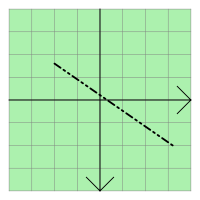
QGraphicsLineItem uses the line and the pen width to provide a reasonable implementation of boundingRect(), shape(), and contains(). The paint() function draws the line using the item's associated pen.
See Also▲
Member Type Documentation▲
enum QGraphicsLineItem::anonymous▲
The value returned by the virtual type() function.
|
Constant |
Value |
Description |
|---|---|---|
|
QGraphicsLineItem::Type |
6 |
A graphics line item |
Member Function Documentation▲
[explicit] QGraphicsLineItem::QGraphicsLineItem(QGraphicsItem *parent = nullptr)▲
Constructs a QGraphicsLineItem. parent is passed to QGraphicsItem's constructor.
See Also▲
See also QGraphicsScene::addItem()
[explicit] QGraphicsLineItem::QGraphicsLineItem(const QLineF &line, QGraphicsItem *parent = nullptr)▲
Constructs a QGraphicsLineItem, using line as the default line. parent is passed to QGraphicsItem's constructor.
See Also▲
See also QGraphicsScene::addItem()
[explicit] QGraphicsLineItem::QGraphicsLineItem(qreal x1, qreal y1, qreal x2, qreal y2, QGraphicsItem *parent = nullptr)▲
Constructs a QGraphicsLineItem, using the line between (x1, y1) and (x2, y2) as the default line. parent is passed to QGraphicsItem's constructor.
See Also▲
See also QGraphicsScene::addItem()
[virtual] QGraphicsLineItem::~QGraphicsLineItem()▲
Destroys the QGraphicsLineItem.
[override virtual] QRectF QGraphicsLineItem::boundingRect() const▲
Reimplements: QGraphicsItem::boundingRect() const.
[override virtual] bool QGraphicsLineItem::contains(const QPointF &point) const▲
Reimplements: QGraphicsItem::contains(const QPointF &point) const.
[override virtual] bool QGraphicsLineItem::isObscuredBy(const QGraphicsItem *item) const▲
Reimplements: QGraphicsItem::isObscuredBy(const QGraphicsItem *item) const.
QLineF QGraphicsLineItem::line() const▲
[override virtual] QPainterPath QGraphicsLineItem::opaqueArea() const▲
Reimplements: QGraphicsItem::opaqueArea() const.
[override virtual] void QGraphicsLineItem::paint(QPainter *painter, const QStyleOptionGraphicsItem *option, QWidget *widget = nullptr)▲
Reimplements: QGraphicsItem::paint(QPainter *painter, const QStyleOptionGraphicsItem *option, QWidget *widget).
QPen QGraphicsLineItem::pen() const▲
Returns the item's pen, or a black solid 0-width pen if no pen has been set.
See Also▲
See also setPen()
void QGraphicsLineItem::setLine(const QLineF &line)▲
void QGraphicsLineItem::setLine(qreal x1, qreal y1, qreal x2, qreal y2)▲
This is an overloaded function.
Sets the item's line to be the line between (x1, y1) and (x2, y2).
This is the same as calling setLine(QLineF(x1, y1, x2, y2)).
void QGraphicsLineItem::setPen(const QPen &pen)▲
Sets the item's pen to pen. If no pen is set, the line will be painted using a black solid 0-width pen.
See Also▲
See also pen()
[override virtual] QPainterPath QGraphicsLineItem::shape() const▲
Reimplements: QGraphicsItem::shape() const.
[override virtual] int QGraphicsLineItem::type() const▲
Reimplements: QGraphicsItem::type() const.